 Renée Carignan
 Optemization
Product | Dashboards (Talent Compass) |
Expert(s) | Shalan Billault-lee, Alex Shadley (CRM team) |
Slack channel | |
This article was last verified on | 05/23/2024 |
🔍 Articles in This Section
Please use the following list to see additional internal articles regarding Dashboards:
- (Internal) Dashboards overview
- (Internal) Dashboard library
- (Internal) Talent Compass: Definitions and terminology (📍you are here)
- (Internal) Dashboard reference lines for time-series widgets
- (Internal) Dashboards presentation view
This is an INTERNAL RESOURCE — for customers asking questions about specific metrics, feel free to copy relevant information into a separate doc to share with them.
Context
- You can report on metrics in Dashboards. Metrics that are supported for your ATS can be found in the metrics dropdown.
- To display it on your Dashboard, create a widget.
- Pre-set widgets for a metric, with common filters / group bys applied can be found in the widget library.

Metric list

Widget library
- Different backends power reporting in Gem
- Outreach Stats - outreach activity in Gem (ex: viewed on LinkedIn, messages sent)
- Pipeline Metrics - application activity from your ATS (ex: stage activity, time in stage, PTR, jobs)
- Metrics API - a catch all for nearly everything else
- Job openings
- Interviews
- Scorecards
- Current Pipeline
- HRIS/employee metrics
- These backends do NOT seamlessly talk to one another
- Not all dimensions (filters,group bys) will be usable across all metrics
- Not all segmentations will be supported for all metrics since they need to be implemented separately
- Customers will frequently ask why not all dimensions are ubiquitous across all metrics. Explaining this implementation, and the rationale for why certain filter / dimension combinations don’t make sense is usually is enough to resolve any feedback / questions on this front.
Dimensions(filters,segmentations)
- “… w/ hierarchy” dimensions are only available as filters , NOT segmentations (group by, breakdown)
- Custom fields (from your ATS)
- Greenhouse and SuccessFactors CFs are written to generic tables. CFs aren’t synced/exposed by default for other ATSs as of Nov 2023.
- Private Greenhouse CFs and Offer CFs need to be exposed by request from the customer. Submit a ticket to eng oncall to help with this.
- Only CFs of type single select multi-select are usable for reporting.
- Requesting “new”dimensions to be added
- For ATSs (mostly ENT) where a customer wants to report on a dimension they don’t currently see, do the following discovery:
- If custom field from the ATS
- Anything that sounds like another customer with the same ATS wouldn’t have it is probably custom. (i.e. “C-1 leader)
- Needs to be of the type
- single-select
- multi-select
- short text (only if field values have few “near-dupes”
- user
- yes_no
- Needs to be prioritized one-off.
- We can expose private CFs by request, but need to file an oncall ticket for eng.
- If a new metric dimension
- Dimensions on existing objects (job, candidate, application) are much easier to prioritize.
- Ask for what object it’s on, confirm it’s a standard field, specific field name, and sample data for validation purposes.
- Needs to be prioritized one-off, work with product / EPD.
Category | Notes + dimension definitions |
Gem (aka Outreach) filters/groupings | • Only applicable to prospects, or applications that were sourced using Gem |
Application filters/groupings | |
Candidate filters/groupings | • Does NOT apply to jobs, job openings, TTF (Metrics API)
• Does apply to current pipeline, interview widgets (Metrics API) |
Job filters/groupings | |
Job opening filters/groupings | |
Offer filters/groupings | |
Custom grouping filters/groupings | |
Scorecard filters/groupings | |
Interview type filters/groupings | |
Stage filters/groupings | |
Employee filters/groupings | • Dimension = “Interviewer response status” (Greenhouse)
• When an interviewee receives an invite to an interview, they can ignore it (needs_action), or respond with Yes/No/Maybe on the invite (Accepted, Declined, Tentative) |
Position filters/groupings | • Only applicable to Workday HRIS metrics |
- More visualization-specific help

EEOC/Self-ID
- We only sync EEOC forms and demographic surveys for Greenhouse, and EEOC forms Lever and Workday.
- We only sync gender, and race / ethnicity.
- Talent Compass customers can use DEI predictions with any ATS, if enabled.
- More on DEI: +DEI Data in Gem
Metric List
Metric | Definition | By ATSAs of May 10, 2024, this column will NOT be maintained. Reference +Gem Feature Capabilities by ATS: TODO:-Talent-Compass | Calculation Notes | Common Configs | Files |
|---|---|---|---|---|---|
Outreach metrics | |||||
Outreach activity | Greenhouse Lever Workday SmartRecruiters SuccessFactors iCIMS Gem ATS Gem Jobs No ATS | Viewed on Linkedin: number of candidate profile pages that were viewed on LinkedIn during the selected time period. This counts unique profile views, so going to the same candidate’s profile page multiple times will not increase this number and only the first view will count. Gem users must have the Extension installed / signed in. Added to Gem: count of net new additions to the Gem CRM during the selected timeframe. Will not count profiles added to projects for the first time. First messages sent: count of first outreach to a prospect in the selected timeframe. Includes Stage 1 of sequences. • First messages count automatically as the first message of an outreach streak (60 days), OR if they are manually marked as a “first reach out”. Follow-ups sent: number of follow-up messages sent during the selected time period. This includes automatically sent messages for Stages 2 and up of Email Sequences and manually sent follow-up InMail Stages. Replies received: count of responses to unique outreach. This should match 1:1 with outreach sent, and a response. i.e. if there are multiple sequences sent to a candidate, only the one they actually respond to will count as a reply. Interested candidates: count of interested candidates. Interested is marked 3 ways: • Mark as interested from Email • Mark as interested in Sequences • Mark as interested in Extension Converted to process: prospect you reached out to in Gem converted to a candidate within 60 days of outreach, and has an application in the ATS you’re using with Gem. | • Visualization = Table view • Group by = team member • Group by = project, breakdown = DEI (gender, or R/E) | https://paper.dropboxstatic.com/static/img/ace/emoji/2705.png?version=8.0.0https://paper.dropboxstatic.com/static/img/ace/emoji/2705.png?version=8.0.0https://paper.dropboxstatic.com/static/img/ace/emoji/2705.png?version=8.0.0https://paper.dropboxstatic.com/static/img/ace/emoji/2705.png?version=8.0.0https://paper.dropboxstatic.com/static/img/ace/emoji/2705.png?version=8.0.0https://paper.dropboxstatic.com/static/img/ace/emoji/2705.png?version=8.0.0https://paper.dropboxstatic.com/static/img/ace/emoji/2705.png?version=8.0.0https://paper.dropboxstatic.com/static/img/ace/emoji/2705.png?version=8.0.0https://paper.dropboxstatic.com/static/img/ace/emoji/2705.png?version=8.0.0 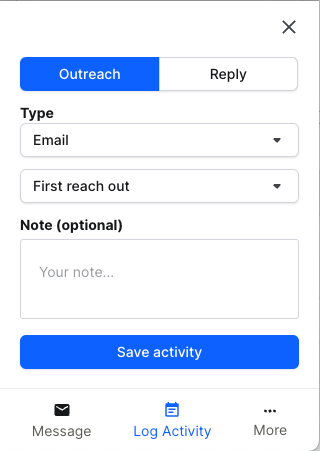 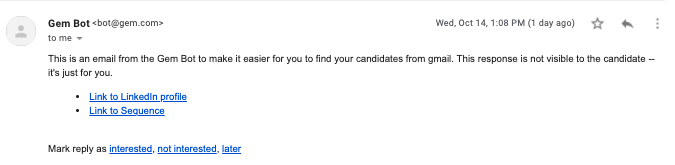 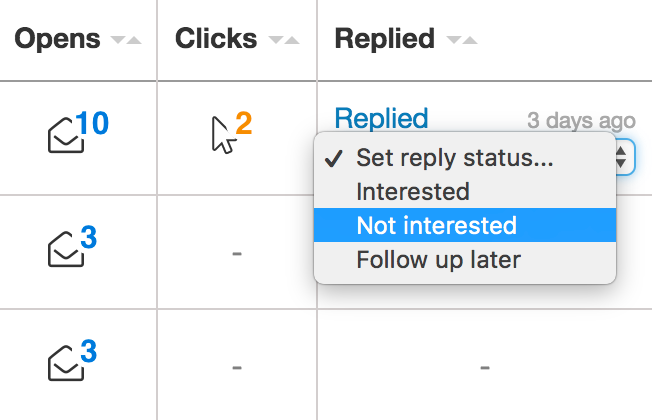 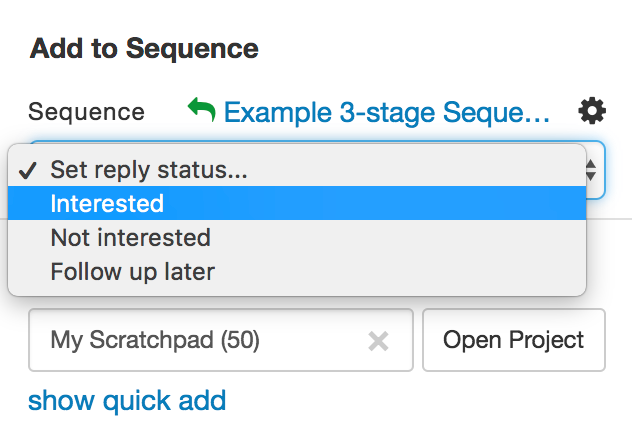 | |
Outreach funnel | Greenhouse Lever Workday SmartRecruiters SuccessFactors iCIMS Gem ATS Gem Jobs No ATS | Outreach funnel specifically looks at the candidate cohort of people that you sent a message you in a specific timeframe. While it’s not shown here, imagine a cohort picker for Outreach Status where cohort = first message sent. You’ll see “passthrough” rates from sent, open, reply, to interested for the cohort of people you sent that outreach to. Opens and open rate: only looks at Sequences (excludes one-off messages). | • Rollup over time • Group by sequence | https://paper.dropboxstatic.com/static/img/ace/emoji/2705.png?version=8.0.0https://paper.dropboxstatic.com/static/img/ace/emoji/2705.png?version=8.0.0https://paper.dropboxstatic.com/static/img/ace/emoji/2705.png?version=8.0.0https://paper.dropboxstatic.com/static/img/ace/emoji/2705.png?version=8.0.0https://paper.dropboxstatic.com/static/img/ace/emoji/2705.png?version=8.0.0https://paper.dropboxstatic.com/static/img/ace/emoji/2705.png?version=8.0.0https://paper.dropboxstatic.com/static/img/ace/emoji/2705.png?version=8.0.0https://paper.dropboxstatic.com/static/img/ace/emoji/2705.png?version=8.0.0https://paper.dropboxstatic.com/static/img/ace/emoji/2705.png?version=8.0.0 | |
Candidate metrics | |||||
Stage activity | Greenhouse Lever Workday SmartRecruiters SuccessFactors iCIMS Gem ATS Gem Jobs No ATS N/A | Stage transition rules: All ATSs besides Greenhouse use stage movement to determine what stage a candidate is in. A user must move the candidate into a particular stage, either in Gem or in their ATS. Greenhouse is the ONLY exception to this rule, where Greenhouse customers have the option to use stage movement, OR stage activity to determine stage transitions. Stage activity looks at events including interviews completed, scorecards submitted, offers created, etc. Status vs. stage: Some ENT ATSs (iCIMS, SuccessFactors) use “status” terminology, which we can use interchangeably for reporting in Gem. Being in a status = being in a stage for Gem reporting. Entrance criteria / Workday business process: some ATSs have rules for what applications can enter a stage. This should NOT have any impact on reporting. | • At stage = Offer • At stage = Hires | https://paper.dropboxstatic.com/static/img/ace/emoji/2705.png?version=8.0.0https://paper.dropboxstatic.com/static/img/ace/emoji/2705.png?version=8.0.0https://paper.dropboxstatic.com/static/img/ace/emoji/2705.png?version=8.0.0https://paper.dropboxstatic.com/static/img/ace/emoji/2705.png?version=8.0.0https://paper.dropboxstatic.com/static/img/ace/emoji/2705.png?version=8.0.0https://paper.dropboxstatic.com/static/img/ace/emoji/2705.png?version=8.0.0https://paper.dropboxstatic.com/static/img/ace/emoji/2705.png?version=8.0.0https://paper.dropboxstatic.com/static/img/ace/emoji/2705.png?version=8.0.0 | |
Time in stage | Greenhouse Lever Workday SmartRecruiters SuccessFactors iCIMS Gem ATS Gem Jobs No ATS N/A | “Candidate applications with first”: similar to Pipeline Analytics, you can define the cohort of applications you look at for TIS. • Select “Application Created” … to look at the most broad set of applications, based on when they first entered process • Select “Rejected/Hired”… to look at only terminal applications, that have finished process. This excludes applications that are still actively interviewing, and is a common misunderstanding / validation problem for customers. • Ex: To see TIS for someone that had a phone interview in X time, but did NOT yet finish interviewing, use the “Phone interview”… selection in this dropdown. Stage transition rules: reminder that for ALL ATSs besides Greenhouse, this timestamp is based on when they were manually moved into or out of the stage (stage movement). Only Greenhouse customers have the option to configure transition rules based on stage activity. Skipped stages: Gem technically counts skipped stages towards TIS, with a time = 0. Therefore, if you have a stage with many skips, you’ll see a low TIS. Benchmarks: supported for TIS. Based on universal Gem stages. Display/calculation: Support for “median”TIS has been deprecated as of Nov 2023. | • From stage = app created, to stage = hired (timeto hire - check out the linked doc for a primer on Gem’s definition, vs. the industry standard) • From stage = app created, to stage = hiring manger review (“time to present”) • From stage = app created, to stage = recruiter phone screen (recruiter is accountable) • Group by = department, job, recruiter, etc. | https://paper.dropboxstatic.com/static/img/ace/emoji/2705.png?version=8.0.0https://paper.dropboxstatic.com/static/img/ace/emoji/2705.png?version=8.0.0https://paper.dropboxstatic.com/static/img/ace/emoji/2705.png?version=8.0.0https://paper.dropboxstatic.com/static/img/ace/emoji/2705.png?version=8.0.0https://paper.dropboxstatic.com/static/img/ace/emoji/2705.png?version=8.0.0https://paper.dropboxstatic.com/static/img/ace/emoji/2705.png?version=8.0.0https://paper.dropboxstatic.com/static/img/ace/emoji/2705.png?version=8.0.0https://paper.dropboxstatic.com/static/img/ace/emoji/2705.png?version=8.0.0 | |
Passthrough rate | Greenhouse Lever Workday SmartRecruiters SuccessFactors iCIMS Gem ATS Gem Jobs No ATS N/A | Waiting candidates: these are candidates in that stage, but have not been actioned on. This can impact PTR calculations, since they will be included in the denominator for PTR. Ex: Waiting candidate in Phone Screen stage, waiting to be scheduled. Including waiting candidates might artificially decrease PTR. Some customers want to be able to omit this from PTR. Skipped stages: candidates that skip stages (i.e. moved immediately to onsite) will still count as “passing through” previous stages, like phone screen. This is incorporated into the PTR calculation. Benchmarks: supported for PTR. Based on universal Gem stages. Only consecutive stages supported at this time (ex: App created > pre-onsite). | • From stage = offer, to stage = hired / accept (offer acceptance rate) • Group by = DEI, department, job, recruiter, etc | https://paper.dropboxstatic.com/static/img/ace/emoji/2705.png?version=8.0.0https://paper.dropboxstatic.com/static/img/ace/emoji/2705.png?version=8.0.0https://paper.dropboxstatic.com/static/img/ace/emoji/2705.png?version=8.0.0https://paper.dropboxstatic.com/static/img/ace/emoji/2705.png?version=8.0.0https://paper.dropboxstatic.com/static/img/ace/emoji/2705.png?version=8.0.0https://paper.dropboxstatic.com/static/img/ace/emoji/2705.png?version=8.0.0https://paper.dropboxstatic.com/static/img/ace/emoji/2705.png?version=8.0.0https://paper.dropboxstatic.com/static/img/ace/emoji/2705.png?version=8.0.0 | |
Current pipeline | Greenhouse Lever Workday SmartRecruiters SuccessFactors iCIMS Gem ATS Gem Jobs No ATS N/A | Additional functionality: current pipeline has some missing functionality we hope to address as soon as we’re able • 2-level group bys (ex: by stage, and by job) are coming • Configurable columns in table view • We may need to rework current pipeline & talent pipeline as a widget Application created stage is intentionally missing. • Performance wise, this would make the widget less reliable. • For the use cases uncovered from customers, other stages are more important to monitor than application created, so it was intentionally omitted | • Group by = stage • Group by = job • Table view | https://paper.dropboxstatic.com/static/img/ace/emoji/2705.png?version=8.0.0https://paper.dropboxstatic.com/static/img/ace/emoji/2705.png?version=8.0.0https://paper.dropboxstatic.com/static/img/ace/emoji/274c.png?version=8.0.0https://paper.dropboxstatic.com/static/img/ace/emoji/274c.png?version=8.0.0https://paper.dropboxstatic.com/static/img/ace/emoji/274c.png?version=8.0.0https://paper.dropboxstatic.com/static/img/ace/emoji/274c.png?version=8.0.0https://paper.dropboxstatic.com/static/img/ace/emoji/274c.png?version=8.0.0https://paper.dropboxstatic.com/static/img/ace/emoji/274c.png?version=8.0.0 | |
Job metrics | |||||
Jobs | Greenhouse Lever Workday SmartRecruiters SuccessFactors iCIMS Gem ATS Gem Jobs No ATS N/A | Jobs vs. job openings: this metric counts jobs, NOT openings. If you have multiple openings you’re hiring for, you’re still hiring for just one that one job. Current job count, NOT historical: reminder that this metric reports only on the # of jobs at this moment, inclusive of open / closed / draft. There is NO historical component, so we cannot show job volume over time. (task) Lever calls these “job postings”. | • Filter = job status • Filter = is NOT job is template • Group by = department, hiring manager • Group by = stage, breakdown = job | https://paper.dropboxstatic.com/static/img/ace/emoji/2705.png?version=8.0.0https://paper.dropboxstatic.com/static/img/ace/emoji/2705.png?version=8.0.0https://paper.dropboxstatic.com/static/img/ace/emoji/2705.png?version=8.0.0https://paper.dropboxstatic.com/static/img/ace/emoji/2705.png?version=8.0.0https://paper.dropboxstatic.com/static/img/ace/emoji/2705.png?version=8.0.0https://paper.dropboxstatic.com/static/img/ace/emoji/2705.png?version=8.0.0https://paper.dropboxstatic.com/static/img/ace/emoji/2705.png?version=8.0.0https://paper.dropboxstatic.com/static/img/ace/emoji/2705.png?version=8.0.0 | |
Job Openings | Greenhouse Lever Workday SmartRecruiters SuccessFactors iCIMS Gem ATS Gem Jobs No ATS N/A | Current job opening count, NOT historical: reminder that this metric reports only on the # of job openings at this moment. There is NO historical component, so we cannot show job volume over time. (task) | • Group by = department, hiring manager (usually for planning / forecasting) | https://paper.dropboxstatic.com/static/img/ace/emoji/2705.png?version=8.0.0https://paper.dropboxstatic.com/static/img/ace/emoji/274c.png?version=8.0.0https://paper.dropboxstatic.com/static/img/ace/emoji/274c.png?version=8.0.0https://paper.dropboxstatic.com/static/img/ace/emoji/274c.png?version=8.0.0https://paper.dropboxstatic.com/static/img/ace/emoji/274c.png?version=8.0.0https://paper.dropboxstatic.com/static/img/ace/emoji/274c.png?version=8.0.0https://paper.dropboxstatic.com/static/img/ace/emoji/274c.png?version=8.0.0https://paper.dropboxstatic.com/static/img/ace/emoji/274c.png?version=8.0.0 | |
Time Open | Greenhouse Lever Workday SmartRecruiters SuccessFactors iCIMS Gem ATS Gem Jobs No ATS N/A | Calculation notes: • Looking at the job opening object, NOT the job. (You must have an opening tied to a job, to hire for it). • Only for current job openings with status = open. • Includes weekends and holidays. This is NOT configurable today. • Since job open time, NOT job creation. | https://paper.dropboxstatic.com/static/img/ace/emoji/2705.png?version=8.0.0https://paper.dropboxstatic.com/static/img/ace/emoji/274c.png?version=8.0.0https://paper.dropboxstatic.com/static/img/ace/emoji/274c.png?version=8.0.0https://paper.dropboxstatic.com/static/img/ace/emoji/274c.png?version=8.0.0https://paper.dropboxstatic.com/static/img/ace/emoji/274c.png?version=8.0.0https://paper.dropboxstatic.com/static/img/ace/emoji/274c.png?version=8.0.0https://paper.dropboxstatic.com/static/img/ace/emoji/274c.png?version=8.0.0https://paper.dropboxstatic.com/static/img/ace/emoji/274c.png?version=8.0.0 | ||
Time to Fill | Greenhouse Lever Workday SmartRecruiters SuccessFactors iCIMS Gem ATS Gem Jobs No ATS N/A | Calculation notes: • Looking at the job opening object, NOT the job. (You must have an opening tied to a job, to hire for it). • Only for job openings with status = closed, ones that you have “filled”. This metric is historical. • Display has a decimal point (100.0 days) to allow for TTF <1 day to be displayed. (Customer request). • This is NOT yet converted to hours, and would be a separate feature request. • The option to include TTF <1 day is hardcoded, and must be enabled by request to eng. Submit an oncall ticket. | https://paper.dropboxstatic.com/static/img/ace/emoji/2705.png?version=8.0.0https://paper.dropboxstatic.com/static/img/ace/emoji/2705.png?version=8.0.0https://paper.dropboxstatic.com/static/img/ace/emoji/274c.png?version=8.0.0https://paper.dropboxstatic.com/static/img/ace/emoji/274c.png?version=8.0.0https://paper.dropboxstatic.com/static/img/ace/emoji/274c.png?version=8.0.0https://paper.dropboxstatic.com/static/img/ace/emoji/274c.png?version=8.0.0https://paper.dropboxstatic.com/static/img/ace/emoji/274c.png?version=8.0.0https://paper.dropboxstatic.com/static/img/ace/emoji/274c.png?version=8.0.0 | ||
Requisitions | Greenhouse Lever Workday SmartRecruiters SuccessFactors iCIMS Gem ATS Gem Jobs No ATS N/A | See more on Lever job postings vs. requisitions. Quick facts: • Lever postings are NOT 1:1 with requisitions. • Ex: multiple postings hiring for multiple locations, to fill 1 headcount defined in the requisition. Only hiring 1 person. • Ex: multiple requisitions for 1 posting, to fill a position that is flexible on comp / level / budget. Calculation notes: • Includes ALL requisitions by default (open, closed, pending/unlisted). | https://paper.dropboxstatic.com/static/img/ace/emoji/274c.png?version=8.0.0https://paper.dropboxstatic.com/static/img/ace/emoji/2705.png?version=8.0.0https://paper.dropboxstatic.com/static/img/ace/emoji/274c.png?version=8.0.0https://paper.dropboxstatic.com/static/img/ace/emoji/274c.png?version=8.0.0https://paper.dropboxstatic.com/static/img/ace/emoji/274c.png?version=8.0.0https://paper.dropboxstatic.com/static/img/ace/emoji/274c.png?version=8.0.0https://paper.dropboxstatic.com/static/img/ace/emoji/274c.png?version=8.0.0https://paper.dropboxstatic.com/static/img/ace/emoji/274c.png?version=8.0.0 | ||
Headcount | Greenhouse Lever Workday SmartRecruiters SuccessFactors iCIMS Gem ATS Gem Jobs No ATS N/A | See more on Lever headcount. Calculation notes: • Only for open requisitions. • Excludes hires already made. We only report on unfilled headcount. | https://paper.dropboxstatic.com/static/img/ace/emoji/274c.png?version=8.0.0https://paper.dropboxstatic.com/static/img/ace/emoji/2705.png?version=8.0.0https://paper.dropboxstatic.com/static/img/ace/emoji/274c.png?version=8.0.0https://paper.dropboxstatic.com/static/img/ace/emoji/274c.png?version=8.0.0https://paper.dropboxstatic.com/static/img/ace/emoji/274c.png?version=8.0.0https://paper.dropboxstatic.com/static/img/ace/emoji/274c.png?version=8.0.0https://paper.dropboxstatic.com/static/img/ace/emoji/274c.png?version=8.0.0https://paper.dropboxstatic.com/static/img/ace/emoji/274c.png?version=8.0.0 | ||
Interview metrics | |||||
Interviews | Greenhouse Lever Workday SmartRecruiters SuccessFactors iCIMS Gem ATS Gem Jobs No ATS N/A | Calculation notes: • Counts individual interviews, NOT loops / stages. • Ex: 1 phone screen at the pre-screen stage = 1 interview. • Ex: 1 technical interview, 1 behavioral interview, 1 lunch, 1 presentation at the onsite stage = 4 interviews • A common piece of feedback we get from customers is wanting to see “count of upcoming onsites”. • This is NOT currently possible (stage activity is historical only in dashboards). • We may address this feedback in the future. (task) • We only count if the interview has elapsed, even if it was cancelled/didn’t actually happen. Customers must delete interviews that didn’t actually occur for accurate reporting in Gem. Use cases: • The most common use case for this metric is for interview planning / monitoring interview load / velocity. Related, but NOT supported asks: • Count of interviews scheduled, “how many did my RC schedule this week”? | • Group by = Interviewer • Group by = stage • Group by = job | https://paper.dropboxstatic.com/static/img/ace/emoji/2705.png?version=8.0.0https://paper.dropboxstatic.com/static/img/ace/emoji/2705.png?version=8.0.0https://paper.dropboxstatic.com/static/img/ace/emoji/274c.png?version=8.0.0https://paper.dropboxstatic.com/static/img/ace/emoji/274c.png?version=8.0.0https://paper.dropboxstatic.com/static/img/ace/emoji/274c.png?version=8.0.0https://paper.dropboxstatic.com/static/img/ace/emoji/274c.png?version=8.0.0https://paper.dropboxstatic.com/static/img/ace/emoji/274c.png?version=8.0.0https://paper.dropboxstatic.com/static/img/ace/emoji/274c.png?version=8.0.0 | |
Interview time | Greenhouse Lever Workday SmartRecruiters SuccessFactors iCIMS Gem ATS Gem Jobs No ATS N/A | Calculation notes: • Timestamp for the interview itself, NOT when it was scheduled. • Sum = total interview time. This is not averaged out over individual interviews. Use cases: • Load balancing between interviewers, or playing defense if an interviewer is saying they have “too many” | • Group by = interviewer | https://paper.dropboxstatic.com/static/img/ace/emoji/2705.png?version=8.0.0https://paper.dropboxstatic.com/static/img/ace/emoji/2705.png?version=8.0.0https://paper.dropboxstatic.com/static/img/ace/emoji/274c.png?version=8.0.0https://paper.dropboxstatic.com/static/img/ace/emoji/274c.png?version=8.0.0https://paper.dropboxstatic.com/static/img/ace/emoji/274c.png?version=8.0.0https://paper.dropboxstatic.com/static/img/ace/emoji/274c.png?version=8.0.0https://paper.dropboxstatic.com/static/img/ace/emoji/274c.png?version=8.0.0https://paper.dropboxstatic.com/static/img/ace/emoji/274c.png?version=8.0.0 | |
Interview scorecards | Greenhouse Lever Workday SmartRecruiters SuccessFactors iCIMS Gem ATS Gem Jobs No ATS N/A | Calculation notes: • Counts scorecards, NOT interviews. • Ex: 1 presentation panel interview, 5 interviewers = 5 scorecards. Use cases: • Interview calibrations | • Group by = overall score (see breakdown of decisions) | https://paper.dropboxstatic.com/static/img/ace/emoji/2705.png?version=8.0.0https://paper.dropboxstatic.com/static/img/ace/emoji/2705.png?version=8.0.0https://paper.dropboxstatic.com/static/img/ace/emoji/274c.png?version=8.0.0https://paper.dropboxstatic.com/static/img/ace/emoji/274c.png?version=8.0.0https://paper.dropboxstatic.com/static/img/ace/emoji/274c.png?version=8.0.0https://paper.dropboxstatic.com/static/img/ace/emoji/274c.png?version=8.0.0https://paper.dropboxstatic.com/static/img/ace/emoji/274c.png?version=8.0.0https://paper.dropboxstatic.com/static/img/ace/emoji/274c.png?version=8.0.0 | |
Time to complete scorecard | Greenhouse Lever Workday SmartRecruiters SuccessFactors iCIMS Gem ATS Gem Jobs No ATS N/A | Calculation notes: • Counts time for each submission • When grouping by individual interview, will take average time across all their submissions in the time frame Use cases: • Going after a “naughty list” | • Group by = interviewer | https://paper.dropboxstatic.com/static/img/ace/emoji/2705.png?version=8.0.0https://paper.dropboxstatic.com/static/img/ace/emoji/2705.png?version=8.0.0https://paper.dropboxstatic.com/static/img/ace/emoji/274c.png?version=8.0.0https://paper.dropboxstatic.com/static/img/ace/emoji/274c.png?version=8.0.0https://paper.dropboxstatic.com/static/img/ace/emoji/274c.png?version=8.0.0https://paper.dropboxstatic.com/static/img/ace/emoji/274c.png?version=8.0.0https://paper.dropboxstatic.com/static/img/ace/emoji/274c.png?version=8.0.0https://paper.dropboxstatic.com/static/img/ace/emoji/274c.png?version=8.0.0 | |
Scorecard completion rate | Greenhouse Lever Workday SmartRecruiters SuccessFactors iCIMS Gem ATS Gem Jobs No ATS N/A | Use cases: • Going after a “naughty list” | • Group by = interviewer | https://paper.dropboxstatic.com/static/img/ace/emoji/2705.png?version=8.0.0https://paper.dropboxstatic.com/static/img/ace/emoji/274c.png?version=8.0.0https://paper.dropboxstatic.com/static/img/ace/emoji/274c.png?version=8.0.0https://paper.dropboxstatic.com/static/img/ace/emoji/274c.png?version=8.0.0https://paper.dropboxstatic.com/static/img/ace/emoji/274c.png?version=8.0.0https://paper.dropboxstatic.com/static/img/ace/emoji/274c.png?version=8.0.0https://paper.dropboxstatic.com/static/img/ace/emoji/274c.png?version=8.0.0https://paper.dropboxstatic.com/static/img/ace/emoji/274c.png?version=8.0.0 | |
Employee metrics | |||||
Departures | Workday ADP BambooHR Rippling | Calculation notes: • Includes all terminations, includes voluntary and involuntary terminations Permissions: only Gem admins will see departures data. Setup: requires integration via custom reports. Sync timing: is different from the ATS. Refreshes every 24 hours. | • Rollup = quarterly • Group by = cost center, job level, location • Group by = manager | https://paper.dropboxstatic.com/static/img/ace/emoji/2705.png?version=8.0.0https://paper.dropboxstatic.com/static/img/ace/emoji/274c.png?version=8.0.0https://paper.dropboxstatic.com/static/img/ace/emoji/274c.png?version=8.0.0https://paper.dropboxstatic.com/static/img/ace/emoji/274c.png?version=8.0.0 |

