Product | Sequences |
Expert(s) | Shalan Billault-lee (CRM team) |
Slack channel | |
This article was last verified on | 05/28/2024 |
🔍 Articles in This Section
Please use the following list to see additional internal articles regarding sequences:
- Sequences: Overview
- Sequences: Manual Stages
- Sequence Replies: Using Gem AI to Automatically Set “Interested” Reply Status
- Sequences: Premium Email Finding Auto-Send When Email Is Returned
- Sequences: Auto-sequence upon Form Submission
- Sequences: InMail Reply Tracking
- Sequences: SMS Launch Overview
- Sequences: Call Forwarding Overview (📍you are here)
- Sequences: Linking Gem Sequence Activity for an ATS Job
- Sequences: GoodTime Meet integration
Background
With the successful launch of SMS for sequences, candidates are now receiving text messages from users’ Gem phone numbers. Historically, these phone numbers have only supported text messaging, where candidate responses are delivered to the users’ Gem inboxes. With the launch of call forwarding, phone calls placed from the candidate to the user will be forwarded as well.
This has been of interest for multiple enterprise customers (Lyft, SpaceX), as well as for customers in non-traditional verticals who are hiring people outside of our historic knowledge workers core — talent who may not be sitting in front of their computers checking email all day, but who may be more receptive / available by phone.
Who
Call forwarding is available for all customers who have SMS access — by default, this includes all customers on Gem for Teams or Gem Enterprise. (Note: individual users will also need their team admin to provision them a phone number, via Team Settings).
Functional Overview
By default, call forwarding is disabled. In order to enable it, users will need to go to their settings page. After configuring, call forwarding is a somewhat passive addition; a candidate must call the user’s Gem phone number in order for Gem to forward the call to the user. The details around call forwarding configuration and reception of forwarded calls are discussed below.
Configuration
- In the settings page, users will see a Call Forwarding section towards the bottom of the page
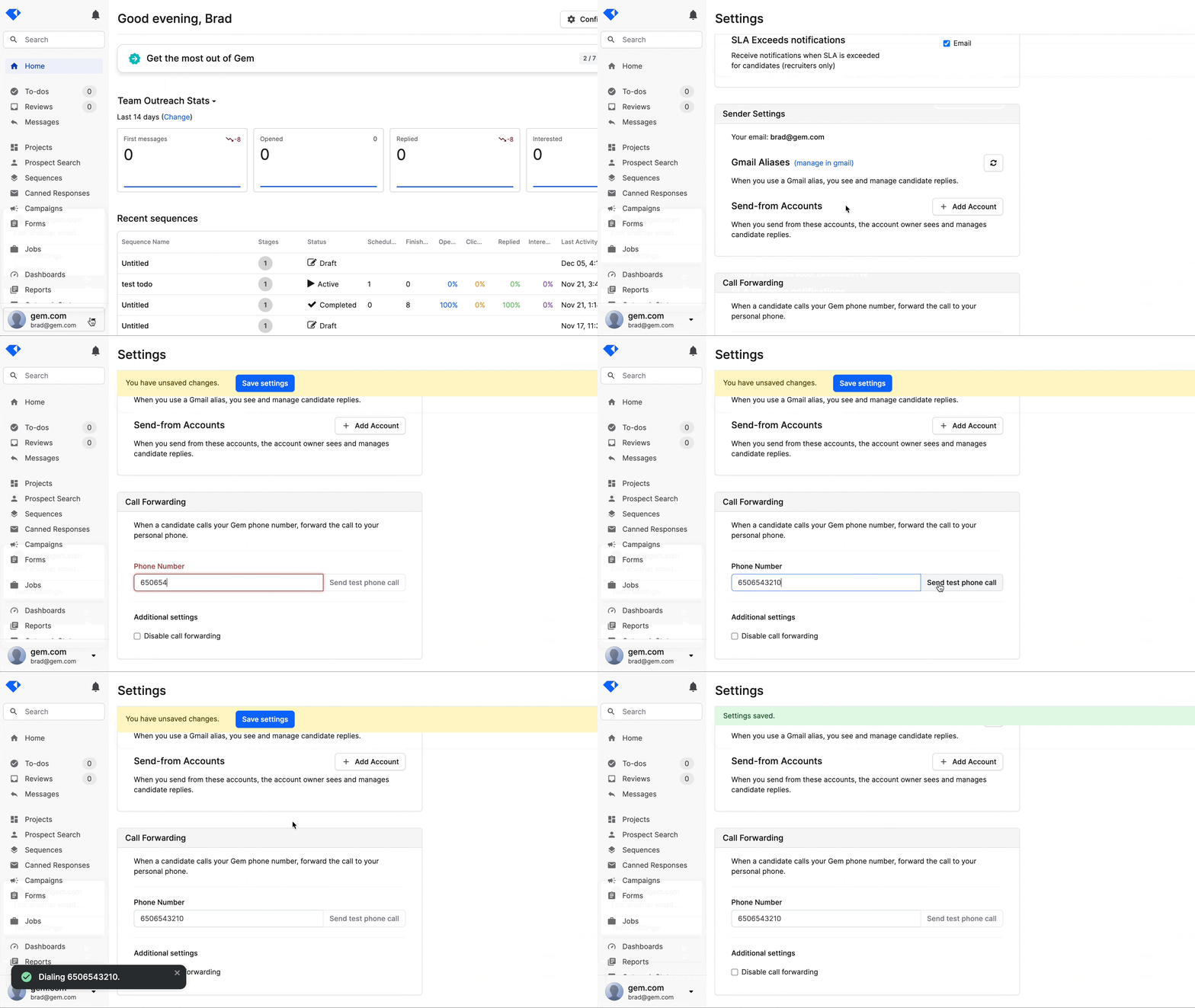
* If this cannot be found, the team likely does not currently have access to the SMS CRM- A user can input their phone number and click “Send test phone call”
- The user will receive a phone call that reads:
- Welcome to call forwarding! Please save your settings to confirm this phone number. The phone number that is calling you will also be the same number that candidates appear under. We recommend saving it as a contact. Happy sourcing, goodbye!
- After adjusting any additional settings (currently only “Disable call forwarding”), the user can save their settings. Call forwarding is now configured.
Receiving incoming calls from candidates
If a candidate calls a user’s Gem phone number, we first check to see if the user has call forwarding enabled. This means that a phone number has been entered and “Disable call forwarding” is not checked, as shown in the settings page gif above.
If call forwarding is disabled, the candidate will be played a message that reads:
- Thanks for calling! This number is for texting only. Have a great day.
No further action is taken.
If call forwarding is enabled, the user inputted phone number will receive a phone call via their Gem phone number. Upon acceptance, the user will be played a message that reads:
- This is an incoming call from
. Connecting now…
The user will then be connected to the candidate.
Surfacing forwarded phone calls in Gem
After a forwarded call is complete, we automatically make a record of it in Gem. This takes place in three ways:
- The user will receive an email that looks as follows

- A notification is generated

- An incoming call reply touchpoint is logged in the candidate’s activity feed
- Note: since we treat this as a reply, sequences are automatically paused!

FutureIterations
Call forwarding is currently in a state where we feel it can provide significant value to users. If we receive signal of wide adoption or requests for extended functionality, there is the possibility of its capabilities growing. Some of the possible areas where call forwarding capabilities could expand are:
- Calling candidates via Gem numbers (reverse direction of call forwarding)
- Syncing phone call logs to an ATS
- Additional settings for call forwarding
- Don’t play preview message
- Use candidate number instead of Gem number for caller ID
- Phone number verification flow in the user settings
- May be an improvement on the current “Send a test call” flow
FAQs
Q: What happens if an unknown number calls a user’s Gem phone?
A: If we cannot find a corresponding candidate in the team’s Gem instance we do not forward the phone call. Instead, the person calling will be played a message as follows.
- Thanks for calling! This number is currently unavailable. Have a great day.
Q: What happens to incoming calls if the SMS CRM is turned off?
A: While call forwarding is enabled, users will still receive calls, similar to how they will still receive text messages. If a user disables call forwarding, it will no longer appear in their settings. Incoming phone calls will by playing the appropriate message to the caller.
Q: What happens in the event of a missed call?
A: In the event of a missed call, we still send an email, add a notification, and log a “replied” incoming call touchpoint in Gem. This is no different than if the user had answered the call.
- Technical explanation as to why this is done: while we are able to forward calls from candidates to recruiters, we are unable to accurately detect if the user picks up or if the responding voice on the line is just their voicemail. Twilio has an machine learning offering called AMD (Answering Machine Detection), but it is not fully accurate and appears that it would overcomplicate call forwarding. As such, the safe approach is to treat all forwarded calls consistently.