Overview
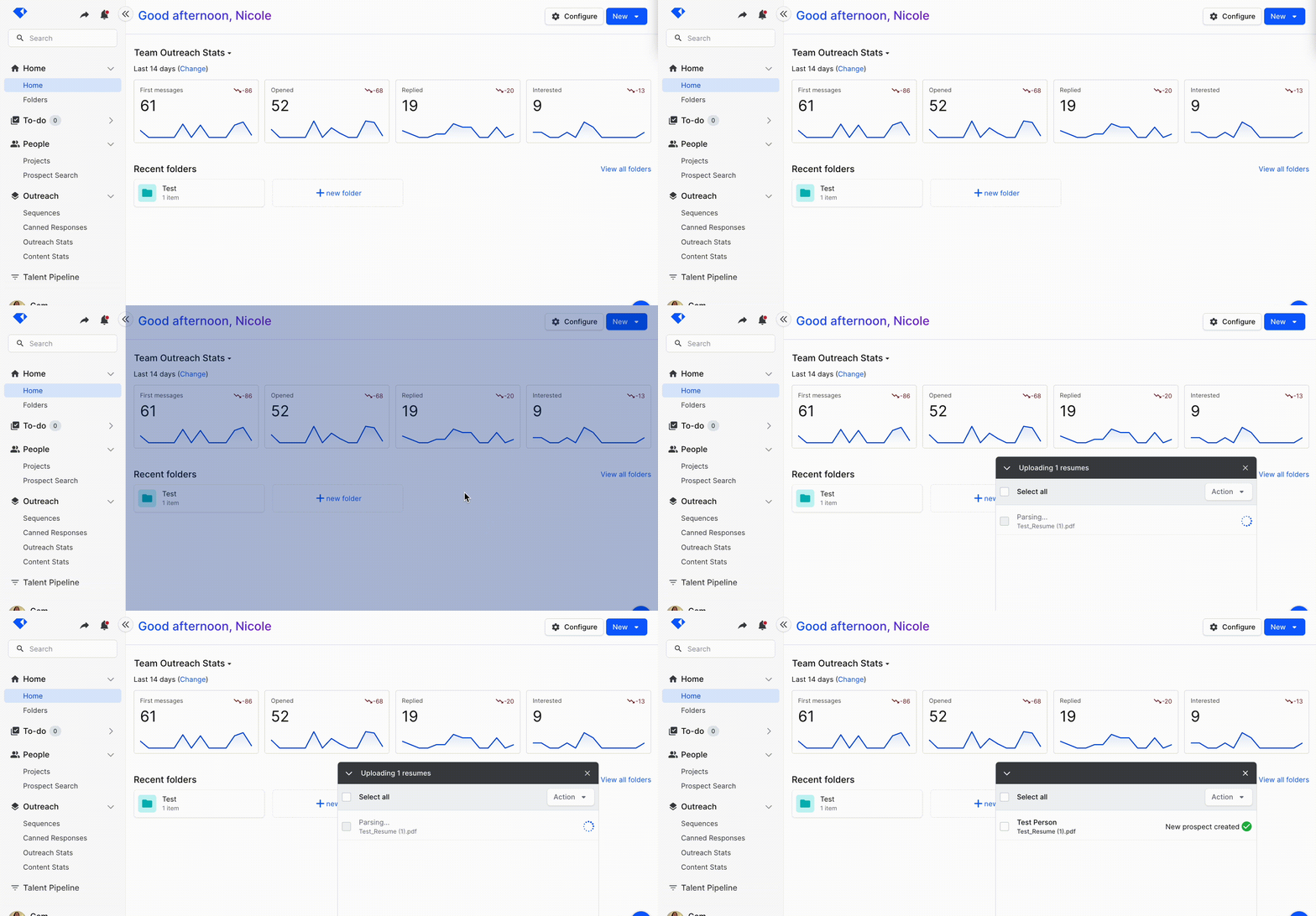
You can create a Gem person (Prospect, Candidate) by dragging and dropping a PDF resume into Gem using the extension or Gem website.
By default, new persons will be put into “My Scratchpad” upon upload. You must separately add them to a Project, a Sequence, or a Job.
Upon upload, we do the following:
- Resume parsing
- De-duping
Requirements
Anyone with a Gem account can use this feature. To use the extension option, please make sure you have the Gem extension added to your Google Chrome browser first.
How It Works
You can add a new Gem person by dragging and dropping a PDF resumeinto the Extension:

Or, add a new Gem person by dragging and dropping a PDF resume anywhere on the Gem website:
Limitations
- PDFs are the only supported file type for this feature.
- Each PDF must be <5MB in size.
- Resumes take ~15 seconds to parse. Multiple resumes cannot be parsed in parallel.
- Dragging and dropping PDFs into a Project or Sequence does NOT add the candidates to that Project or Sequence. They will be put into “My Scratchpad”.
Have any issues or questions on this topic? Please feel free to contact your dedicated Gem Customer Success Manager directly or our Support team at support@gem.com.